First 1 month FREE for every companyContact us
Corporate Buddy
Made in India, for businesses worldwide . Invite-Only

Assign work.
Follow up.
Close the loop.

Corporate Buddy is the work app for your team, your buyers and your suppliers. Assign reminders, follow up in one thread, and see what is overdue at a glance – without chasing anyone on WhatsApp.
1MONTH FREE
Every company starts free for 1 month
Plus 1 more month free for every buyer or supplier company you invite that joins.
GET IT ONGoogle Play
COMING SOONApp Store
1 month free for every company
Add or remove users anytime
1 more month free for every company you invite*
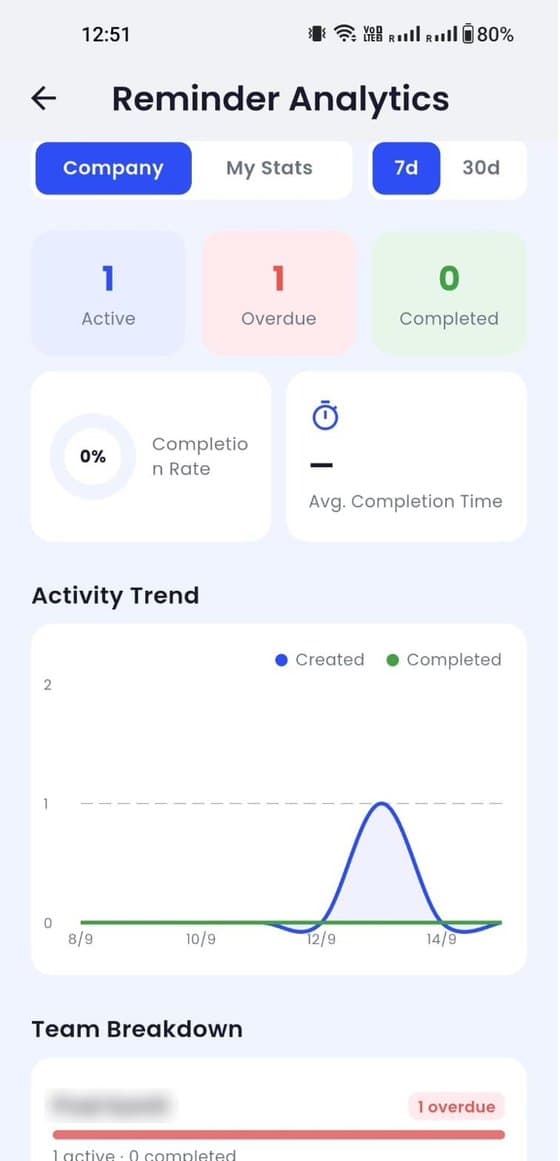
Owner Analytics screen showing active, overdue and completed reminders
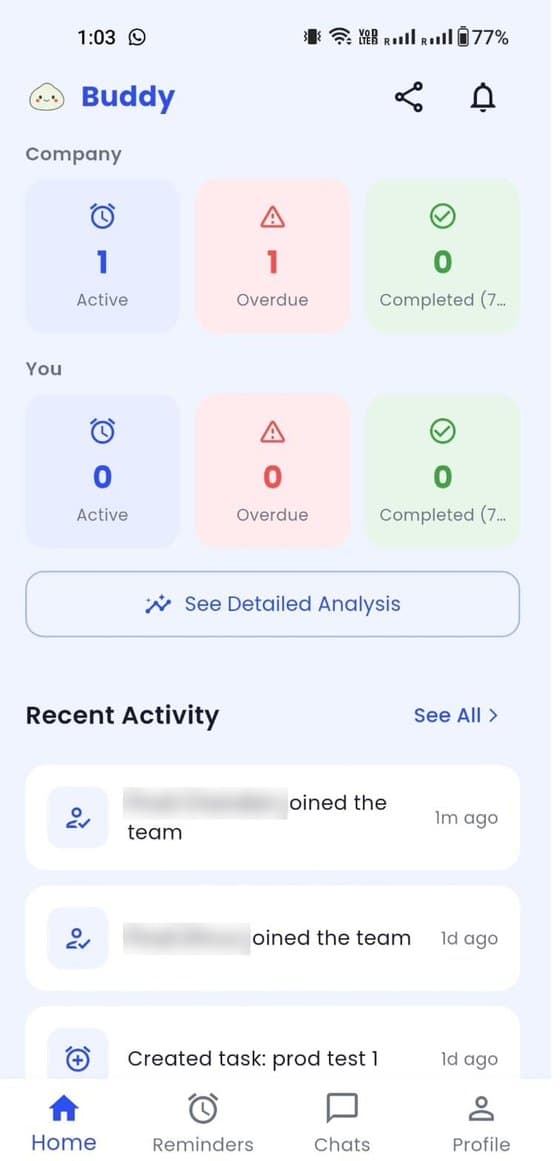
Home dashboard showing company and personal reminder counts
Product tour

See all 13 features in 1 minute.

From owner analytics to buyers and suppliers – a quick walk through the whole app.

The problem

Your work is spread across WhatsApp groups, calls and email.

Tasks get lost

Instructions sink in busy WhatsApp groups. Nobody knows who owns what or when it is due.

Partners need chasing

Every pricing sheet, booking or payment from a buyer or supplier means another call and another follow-up.

Owners fly blind

You only hear something is late when it is already a problem – and you cannot see who is falling behind.

All 13 features

Everything you need to get work done – inside and outside your company.

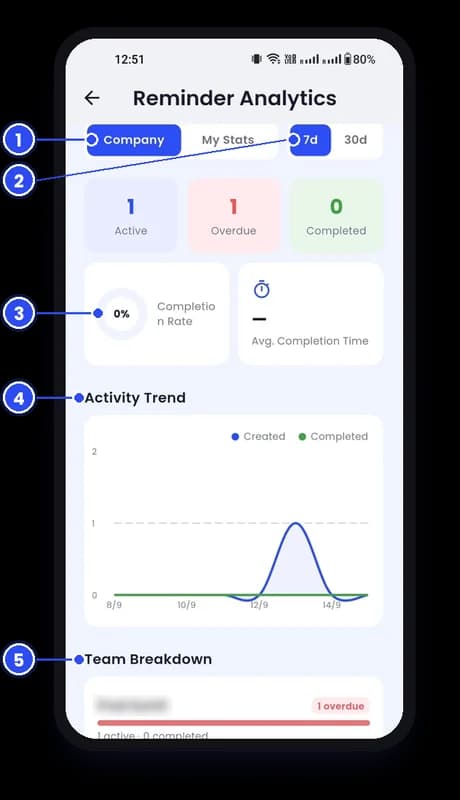
Owner Analytics screen with numbered callouts
01

Owner Analytics

Completion rate, average completion time, 7 or 30-day trends and exactly who has overdue work.
  1. 1Company or My Stats
  2. 27 or 30 days
  3. 3Completion rate and time
  4. 4Activity Trend
  5. 5Team Breakdown
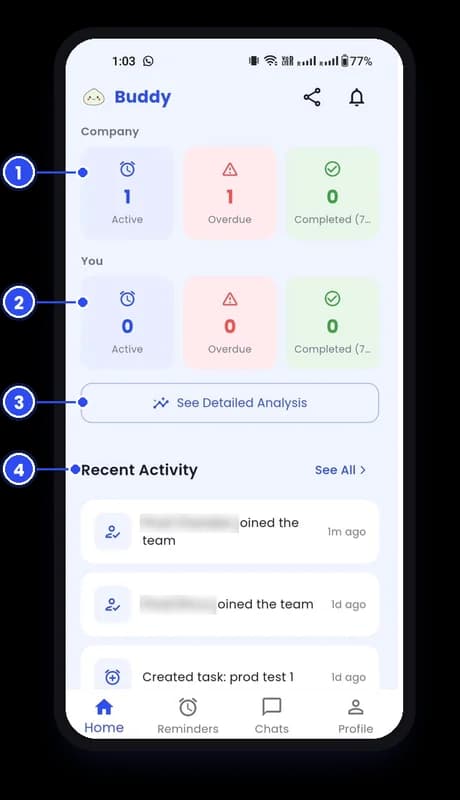
Home Dashboard screen with numbered callouts
02

Home Dashboard

Active, overdue and completed work for the company and for you, with a live activity feed.
  1. 1Company numbers
  2. 2Your numbers
  3. 3See Detailed Analysis
  4. 4Recent Activity
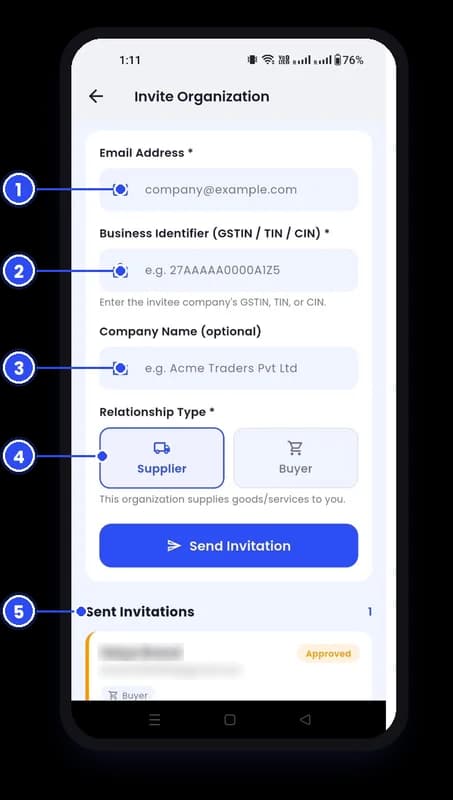
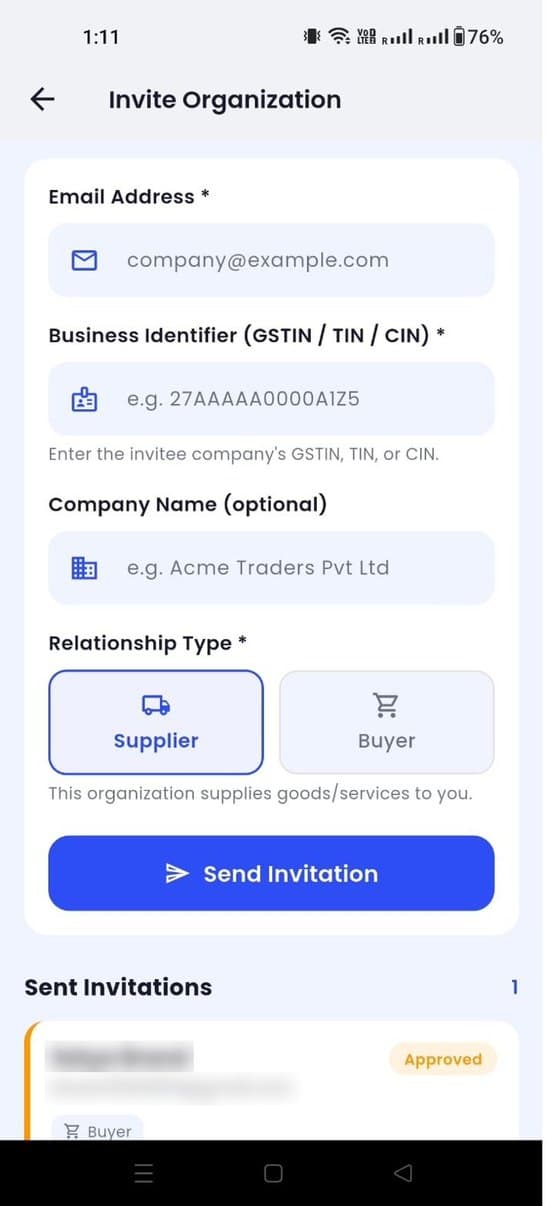
Invite Buyers & Suppliers screen with numbered callouts
03

Invite Buyers & Suppliers

Add partner companies by email and GSTIN, TIN or CIN, tagged as Buyer or Supplier.
  1. 1Company email
  2. 2Business identifier
  3. 3Company name
  4. 4Supplier or Buyer
  5. 5Track invitations
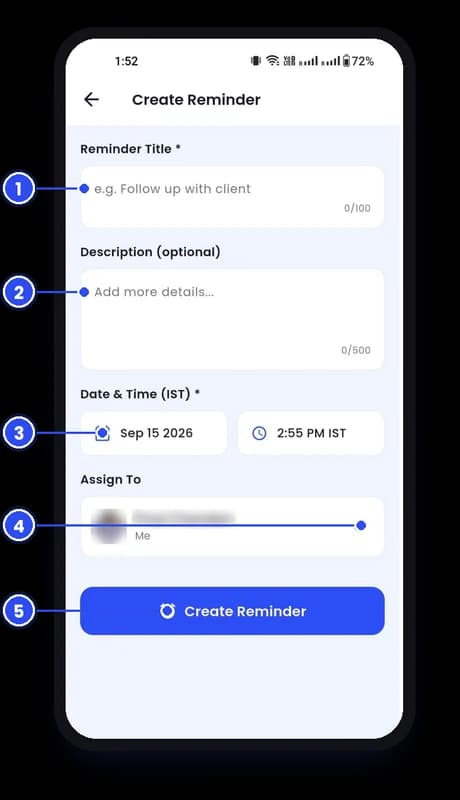
Create a Reminder screen with numbered callouts
04

Create a Reminder

Title, details, due date and time in seconds. Assign it to yourself or a teammate.
  1. 1Title
  2. 2Description
  3. 3Date and time
  4. 4Assign To
  5. 5Create Reminder
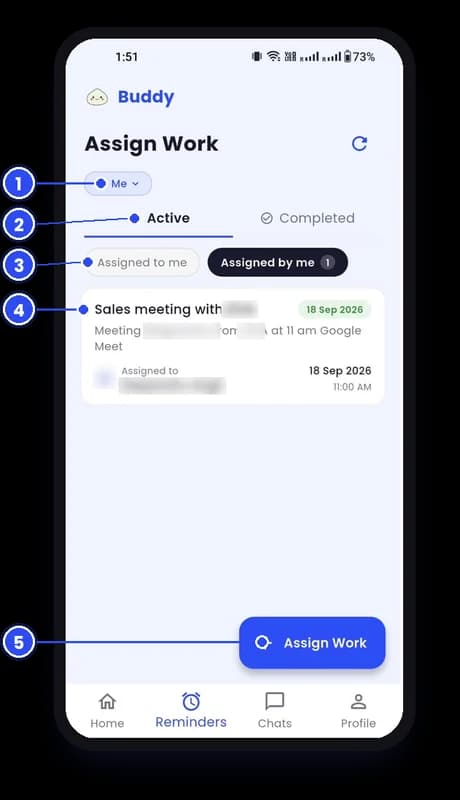
Reminder List screen with numbered callouts
05

Reminder List

Work assigned to you or by you, active or completed, with dates and owners on every card.
  1. 1Filter
  2. 2Active / Completed
  3. 3To me / By me
  4. 4Reminder card
  5. 5Assign Work
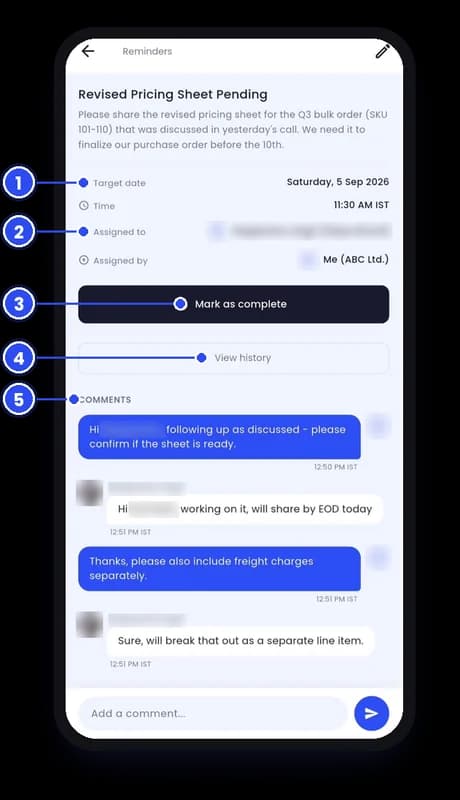
Assign & Follow Up screen with numbered callouts
06

Assign & Follow Up

Assign work to your team or a partner company and follow up in its own comment thread.
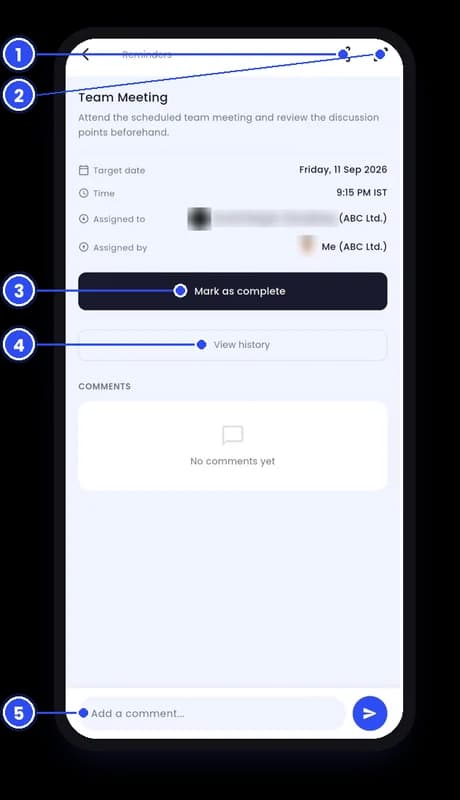
  1. 1Due date and time
  2. 2Assigned to and by
  3. 3Mark as complete
  4. 4View history
  5. 5Comments
Complete or Comment screen with numbered callouts
07

Complete or Comment

Mark work complete with one tap, see the full history or post an update.
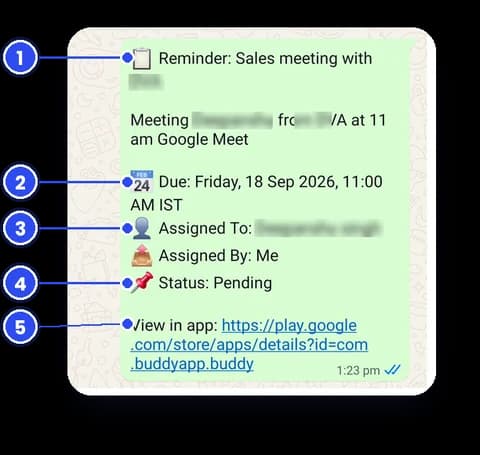
  1. 1Share
  2. 2Edit
  3. 3Mark as complete
  4. 4View history
  5. 5Add a comment
One-tap Reminder Sharing screen with numbered callouts
08

One-tap Reminder Sharing

Share any reminder in one tap – on WhatsApp or any app – with due time, owner and status.
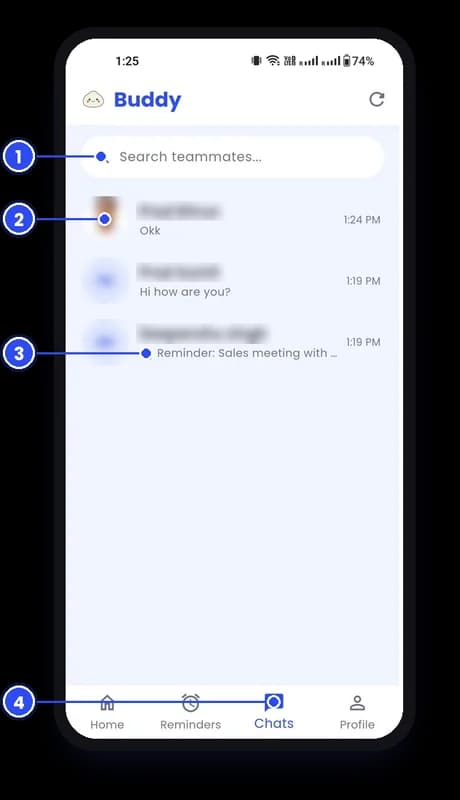
  1. 1Title and details
  2. 2Due date and time
  3. 3Who and from whom
  4. 4Status
  5. 5App link
Chat screen with numbered callouts
09

Chat

Your team, buyers and suppliers in one inbox, with shared reminders right in the conversation.
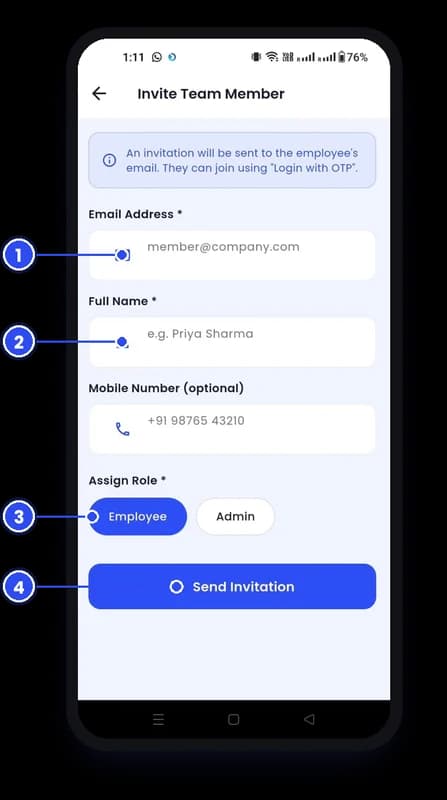
  1. 1Search
  2. 2Conversations
  3. 3Shared reminders
  4. 4Chats tab
Add an Employee screen with numbered callouts
10

Add an Employee

Invite by email with a role. They join with Login with OTP – no passwords to share.
  1. 1Email address
  2. 2Name and mobile
  3. 3Choose a role
  4. 4Send Invitation
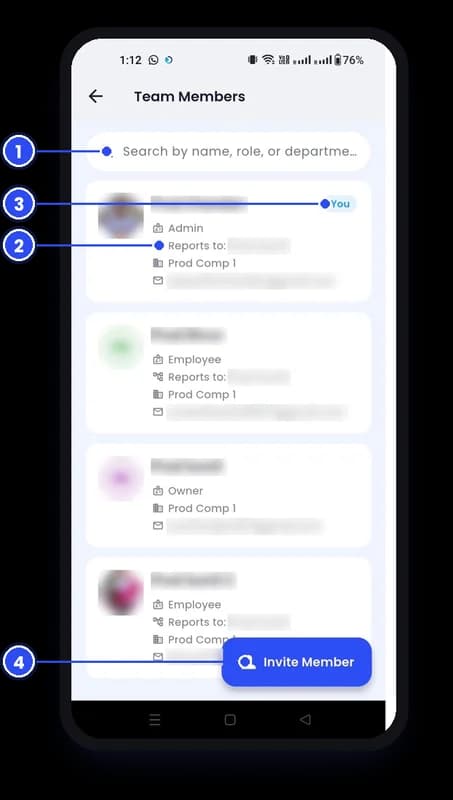
Team Member List screen with numbered callouts
11

Team Member List

Search everyone by name, role or department, with their manager, company and contact.
  1. 1Search
  2. 2Member details
  3. 3Your card
  4. 4Invite Member
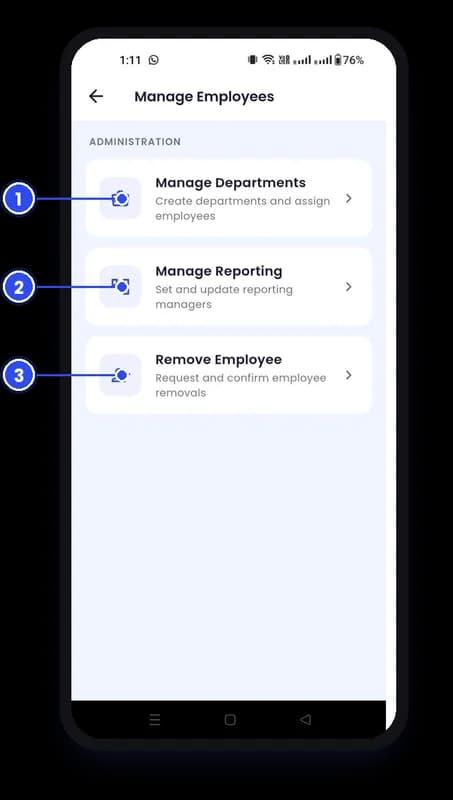
Manage Your Team screen with numbered callouts
12

Manage Your Team

Create departments, set reporting managers and handle removals with a confirm step.
  1. 1Manage Departments
  2. 2Manage Reporting
  3. 3Remove Employee
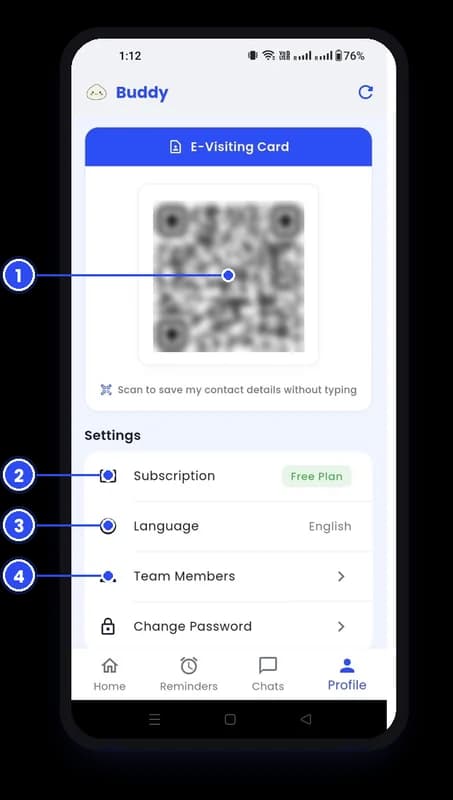
E-Visiting Card & Settings screen with numbered callouts
13

E-Visiting Card & Settings

Your contact as a QR code – anyone can scan and save it – plus plan, language and team settings.

  1. 1Your QR visiting card
  2. 2Subscription
  3. 3Language
  4. 4Team Members
COMING SOON

More on the way

We are building the next set of features with our customers.

Group chatVoice & video callsAnnouncementsRecurring remindersPersonal work listShare documentsShare photosShare contactsShare location
For owners

Know who is falling behind – before it costs you.

Owner Analytics shows what is active, overdue and done across the company, how fast work gets closed, and exactly which person has work slipping.
Company view or your own stats
Completion rate and average completion time
Team breakdown of overdue work, person by person
Owner Analytics with team breakdown of overdue reminders
Invite Organization screen with company email, GSTIN and Supplier or Buyer choice
What makes us different

Your buyers and suppliers, in the same app.

Work does not stop at your company wall. Invite the companies you buy from and sell to, then assign them reminders and chat with their teams – no more chasing on calls.

Invite by email and GSTIN, TIN or CIN
Tag each one as Buyer or Supplier and track approval
Every invited company gets its own 1 month free
For teams

Every follow-up stays with the task.

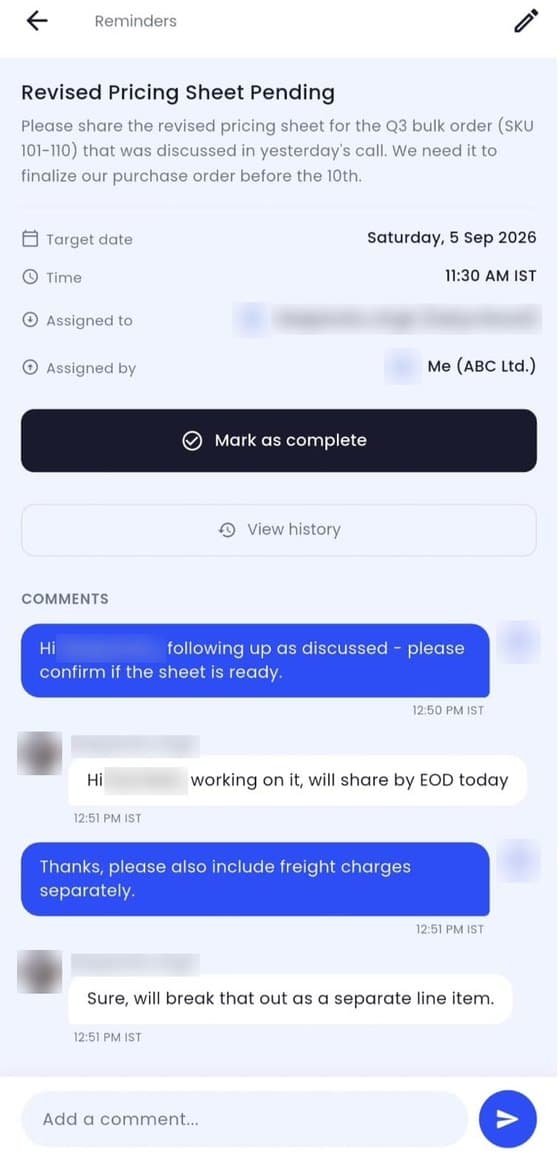
Open a reminder and you see the target date, who assigned it, who owns it, every comment and the full history. When it is done, one tap closes it.
Assigned to me, assigned by me, active and completed
Comment thread and change history on every reminder
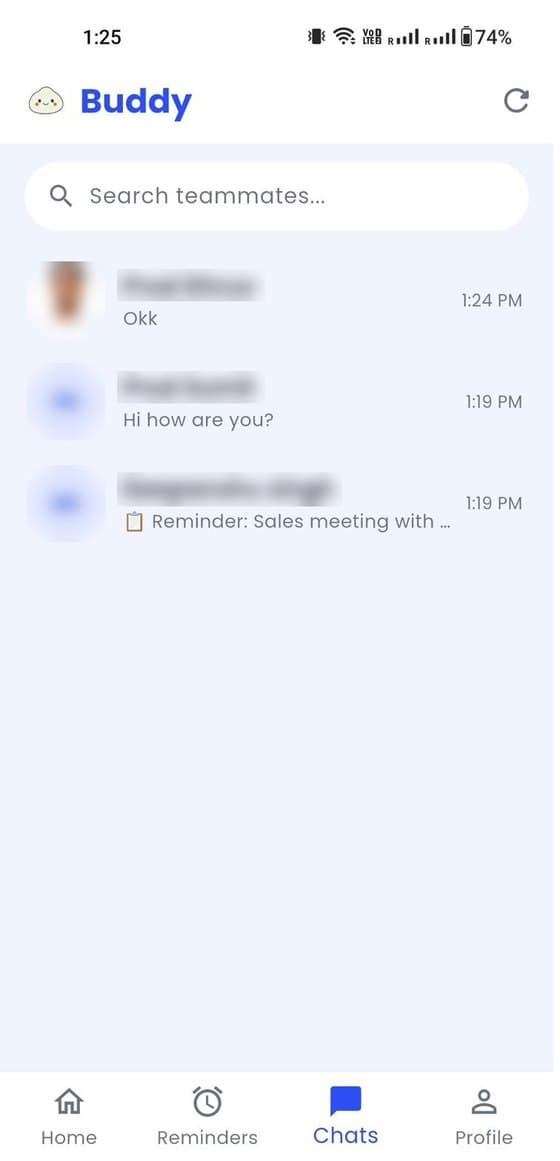
Chat with teammates and partners in one inbox
Reminder detail with target date, assignee, comments and Mark as complete button
Chats list with teammates and partner contacts
How it works

Up and running in 5 minutes.

1
Get your invite

Message us on WhatsApp. We set up your company and your 1 free month start.

2
Add your team

Invite people by email. They join with Login with OTP – no passwords to share. Set departments and managers.

3
Bring in partners

Invite your buyers and suppliers, then assign reminders across companies and track it all from one dashboard.

Pricing

One plan. Every feature. ₹15 a month per person.
No card required.

Start with 1 month free. After that, pay one simple price per user – no feature locks, no storage tiers.

FOR EVERY NEW COMPANY
1 month free

Every feature, for your whole team and all your partners. Pay nothing for your first month.

Contact us to start free
INVITE BONUS
+1 month
free for every new partner company that becomes active
Example
Invite 1 buyer → get 1 month free
Invite 1 supplier → get 1 month free
Earn up to 12 free months
STEP 1
Month 1: ₹0

Use every feature free with your whole team.

STEP 2
Invite and earn more free months

+1 month for each new buyer or supplier company that becomes active, up to 12 months.

STEP 3
Then ₹180 per user / year

Just ₹15 a month per person. Or pay monthly at ₹25 per user.

Basic plan – after your free months

The same plan with every feature. Choose how you want to pay. Add or remove users anytime.

Yearly
Billed once a year
Best value · save 40%
₹180per user / year
Just ₹15 per user / month
Start your free month
Monthly
Billed every month
₹25per user / month
₹300 per user over a year
Start your free month
Yearly
₹900 / year
Monthly
₹125 / month
Prices + 18% GST.

Included in the Basic plan

No extra charge for any of these.

✓ Assign work – reminders with a due date and time
✓ Follow up – comment, complete and see the full history
✓ Chat – with your team and your partners
✓ Partners – invite your buyers and suppliers and assign them work
✓ Owner dashboard – active, overdue and completed work for every person
✓ One-tap sharing – send any reminder on WhatsApp
✓ Team management – departments and reporting managers
✓ E-visiting card – share your contact with a QR scan
Coming soon, at no extra cost:NotesPersonal modeAnnouncementsGroup chatRecurring remindersPersonal to-do listand more

Optional add-ons

Take only what you need, on top of the Basic plan. All add-ons are coming soon – tell us which one you want first.

PER USER
WhatsApp reminders

Reminders reach your staff and partners on WhatsApp.

₹49per user / month
PER COMPANY
Pro features

Approvals, analytics export to Excel, custom reports.

₹99per company / month
PER COMPANY
Verified business badge

We check your registration, so your partners can trust you.

₹99per company / year
PER BRANCH
Multi-branch

Run every branch from the same app. Your main office is free.

₹49per extra branch / month
PER COMPANY
Brand your network

“Corporate Buddy powered by your company” – for your team and your partners.

On demandask us for a price
OFFERS
From our partner companies
Website, domain and email
for your business
Payment reminders
collect payments with a UPI link

Prices exclude 18% GST. 1 free month for every new partner company once it becomes active, up to 12 months. Offers are provided by third-party companies.

FAQ

Questions, answered.

What happens after the 1 free month?+

You choose Pro or Business and pay per user, per month. Message us on WhatsApp before your 1 month end and we will help you pick the right plan.

Why is Corporate Buddy invite-only?+

We set up every company personally so your team, departments and partners are ready from day one. Message us on WhatsApp to get your invite.

What about the buyers and suppliers I invite?+

Every company you invite gets its own 1 month free, just like you – and you get 1 more month free for every company that joins. Max 12 months After their free months, they choose Pro or Business.

Can I add or remove users anytime?+

Yes. New users are charged only for the rest of the month. Removed users stop being billed from your next bill.

How do team members log in?+

They receive an invitation by email and join using Login with OTP, so there are no passwords to share or reset.

Where can I download the app?+

Corporate Buddy is on Google Play for Android phones. The iPhone version on the App Store is coming soon.

FREE NEWSLETTER

Get practical tips to run your business better.

Ideas on managing teams, buyers and suppliers, plus Corporate Buddy product updates. Free – unsubscribe anytime.

By subscribing you agree to receive emails from Corporate Buddy. We never share your email.

Ready to stop chasing follow-ups?

Your first month is free – and every company you invite adds 1 more. Contact us to get started.

Contact us
GET IT ONGoogle Play
COMING SOONApp Store